eBill Me Number1Direct
Showing posts with label software. Show all posts

01 November 2010

com surrogate error libavcodec.dll in windows 7

When try to open " My Pictures" in Windows explorer it shuts down and starts again. Vista or seven then reports that it is a "FFmeg problem" as I have no clue what FFmeg is, I can now not open my pictures folder. Can someone PLEASE tell how I can rectify this problem..
This is the report from Vista or seven

"Product
COM Surrogate

Problem
Stopped working

Status
More information available

Problem signature
Problem Event Name: APPCRASH
Application Name: DllHost.exe
Application Version: 6.0.6000.16386
Application Timestamp: 4549b14e
Fault Module Name: libavcodec.dll
Fault Module Version: 0.0.0.0
Fault Module Timestamp: 47bf1f3c
Exception Code: c0000005
Exception Offset: 001ac183
OS Version: 6.0.6001.2.1.0.256.1
Locale ID: 2057
Additional Information 1: fd00
Additional Information 2: ea6f5fe8924aaa756324d57f87834160
Additional Information 3: fd00
Additional Information 4: ea6f5fe8924aaa756324d57f87834160

solution for this problem just re-install klite mega codec to your system, and done.

28 October 2010

antivirus free download

Computer and internet use is an integral and growing part of our everyday lives. Every aspect of our lives is accessible electronically, which brings considerable benefit, as well as considerable risk. Our role is to shield you from potential dangers by providing powerful, easy-to-use protection that works in the background and allows you to go online with confidence.

As the nature of threats continues to evolve, so too must the nature of protection. That’s why Antivirus uses the latest technology developed by world-renowned security experts to provide real-time defenses against real-time threats. With Antivirus you can surf, shop, bank, download files, chat, network and email safely and confidently, knowing that your personal information will not be stolen or misused.

New AVG ANTI-VIRUS FREE EDITION 2011
* Basic protection
* Anti-Virus & Anti-Spyware

AVG Internet security 2011 complete PC PROTECTION

* Ranked #1 in independent antivirus tests
* Real-time surf, search and social networking protection
* Industry-leading scan speeds

Avira AntiVir Personal - Free Antivirus
Protects your computer against dangerous viruses, worms, Trojans and costly dialers.

Avira AntiVir Premium
If you communicate by email or are a regular Internet user, you need extended virus protection for your PC.

Kaspersky PURE
Kaspersky PURE far exceeds regular PC protection. It renders your PC highly immune to cyber threats of any kind. You can trust Kaspersky PURE to protect the integrity and privacy of all your digital assets and give you complete peace of mind.

Kaspersky Internet Security 2011 NEW!
Kaspersky Internet Security 2011 has everything that you need to stay safe and secure while you're surfing the web. It provides constant protection for you and your family – whether you work, bank, shop or play online.

Kaspersky Anti-Virus 2011 NEW!
Kaspersky Anti-Virus 2011 – the backbone of your PC’s security system, offering real-time automated protection from a range of IT threats. Kaspersky Anti-Virus 2011 provides the basic tools needed to protect your PC.

Kaspersky Mobile Security 9
You make calls, send SMSs, browse the web and communicate via social networks every day. Your smartphone is your life. Kaspersky Mobile Security keeps your private life truly private.

avast! Free Antivirus is free only for personal and non-commercial use
Antivirus with anti-spyware
The minimum protection for every PC.

Norton 360™ Version 4.0
Ultimate protection, performance and peace of mind against digital dangers.

Norton™ Internet Security 2011
Powerful, fast protection to email, shop and bank online without worry.

Norton™ Antivirus 2011
Fast protection that does more to stop viruses and spyware

21 October 2010

Palm OS Operating System

Standard Palm OS mobile operating systems applications

The Palm's Address program: Palm OS allows its address program to store contact information, keyed by any of several user-definable categories. In the Palm’s address program, entries are displayed and sorted in last name, first name order (this can be changed only to Company, Last Name order).

Calculator: Palm OS allows the calculator to turn the Palm into a standard 4-function pocket calculator with three shades of purple and blue buttons contrasting with the two red clear buttons. It supports square root and per cent keys and has one memory.

Date Book: Palm OS has a data book which shows a daily or weekly schedule, or a simple monthly view. The daily schedule has one line per hour, between user-selected begin and end times. Clicking on an empty line creates a new appointment.

Expense: Expense application in the Palm OS mobile operating system tracks common business expenses. No totals are calculated on the Palm.

HotSync: HotSync application in the Palm OS mobile integrates with the user's PC. Usually activated by a press of the physical HotSync button on the Palm's cradle (a dock station), this application communicates with various conduits on the desktop PC to install software, backup databases, or merge changes made on the PC or the handheld to both devices. Exchange

Memo Pad: Memo Pad on Palm OS can hold notes of up to 4,000 characters each; the newer Memos app increases field size from 3 to 30 kB. Memos are ordered in two ways: alphabetically and manually (which allows the user to choose the order of the memos), and memos can be grouped in user-configurable categories.

To-Do list: To-do list in a Palm OS creates personal reminders and prioritizes the things the user has to do. Each To-Do List item may also have a priority, categories (to organize and view items in logical groups), attached Note (to add more description and clarification of the task).

When talking about the operating system or OS, how can we forget the most user-friendly operating system, i.e., Palm OS mobile operating system (also known as Garnet OS or Garnet Operating System). The Palm OS mobile operating system is designed for use with touch screen-based graphical user interface. The Palm OS operating system originated on the Palm Pilot PDA back in the 1990s. This operating system has been updated many times since then, and has evolved to work on the company's line of Treo smart phones. Known for sporting lots of user-friendly features, Palm OS also is a big plus for business users as it allows mobile access to your Outlook mails through Microsoft Exchange Server. Consequently, if you are seeking hosted Microsoft Exchange server to accommodate your Palm phone.

Best Backup Software

Performing data backup software is especially useful when your work is done on a laptop, whether at the office or at home. So, in case something bad happens to your hard disk, the information on that drive can be restored, once the drive is fixed or replaced, with your back up files.

If you store valuable information on your computer, it is wise to use backup software. System backup software stores information you have on your computer. It is like having another copy of everything that you keep on your computer.

Having backup software enables you to save time. Imagine the amount of time you can save if you use software to backup all files, programs, and special applications on your computer and then the next day your hard drive crashes. There is even an automatic backup software that immediately performs backup whenever new data is saved on the hard drive or whenever you have set a backup schedule.
The concept of retrieving the data you saved on your laptop is the primary benefit you can get from pc backup software. This is very important particularly in corporations and business enterprises that view information as revenues. Losing data can cost millions of dollars.

The backup software is compatible with different media and devices. However, if you choose a built-in software, the capability of doing backup is limited. External software allows you to conveniently do backup on your data to any device, optical media and storage systems. You can even initiate partitioning tasks with backup applications. Thus, you can zip your data into smaller bits and store them in many media.

Backup software comes in many types to meet the varying needs of the persons and enterprises. For example, there is specifically designed enterprise backup software. Depending on the operating system you are using, there is software that is compatible for your computer.
Almost all backup software is capable of encryption. Many of the best backup software available in the market can automatically encrypt your data during transfer and backup operations. Hence, you can have the confidence to transfer files onto another disk drive without worrying about data leakage. Encryption is essential, if you are transferring data to a web server.

So, if you are using windows, you can enjoy the benefits of backup using windows xp backup software, vista backup software, windows server backup software and Microsoft backup software. There is also linux backup software for linux operating systems.
For remote operations, choose the appropriate remote backup software or offsite backup software. If you are transferring files to a web, it is good to have the online backup software. Data recovery is a feature of backup software that is very convenient.
In case of disasters, your data is not lost. It can be retrieved and restored back into your systems as if nothing happened. The best software does not even require special hardware or complicated software to make things happen the way you should want them to be.

For more information about the backup software that best suits your need, check out the web for resources. You can also read reviews on products , forum discussions and articles.

05 October 2010

unlimited bass boost on realtek soundcard

Do you feel like your iPhone or iPod needs more bass? Is your favorite Equalizer setting "Bass Boost?" Wish your headphones sounded as good as your home or car stereo system? do not need expensive headphones, super soundcards, just need softwares and your ordinary realtek become extreme. Maybe it's time you may want to try what I've done before.
first step you need a x-fi console at http://www.kaskus.us/showthread.php?t=4900645

and here's how to do it


status:
enable bass boost, bass at 20 Hz and 12db level
speaker configuration on headphone

disable EAX effect

disable x-fi CMSS-3D

enable x-fi crystalizer, set at maximum

enable EQ, set at V configuration

disable EQ at windows media player

and THIS THE POINT TO UNLIMITED BASS BOOST
setting at SRS wow effect see pic above "tru bass" level.

and done, enjoy.

thanks to DaMn PoLitiC (kaskuser)

01 April 2010

boost windows seven

Windows 7 is the new operating system from Microsoft and is considered a major change in terms of features in Vista, you can optimize the Windows 7 by allowing the features needed and disabling all the features that are not wanted.Berikut are some little tips you can follow to get the best of Windows 7.

Disable Search Indexing

to speed up the process of searching, indexing services through files and folders on Windows systems and record information about them in an indexed file. But also consume some resources from the system, so if you do a search once a month will be better this feature is disabled.
read more

surabaya, jual, motherboard, ram, sodimm, ddr2, ddr3, ddr, vga, hardisk, hdd, harga, power, suply, psu, lcd, monitor, price, processor, windows, seven, ide, sata, ahci, pc, computer, modem, xp, lenovo notebook, notebook pc, quad core, laptop windows xp, hp 17 laptop, hp desktop, hp pavilion laptop, mini laptop, ipad, tablet notebook,  desktop pc, tablet pc, intel, hp, lenovo, acer, dell, toshiba, fujitsu, gigabyte, msi, pcchip, asus, kingston, hitachi, seagate, pendrive, western digital, patriot, samsung, transcend, adata, OCZ, buffalo, PQI, biostar, DFI, abit, ecs, zotac, foxconn, corsair, silverstone, antec, cooler master, thermaltake, mushkin, power color, XFX, palit, pixel view, HIS, sapphire, leadtek, gecube, laptop, pc, computer, usb, windows, seven, acer, toshiba, fujitsu, dell, gigabyte, msi, kingston, patriot, hitachi, seagate, maxto, sony, lg
Remove Unwanted Startup Programs

Running a startup program when you are logged into the system, so we see which programs you have allowed to run on start up, you may find many in the list where you no longer need to start at system boot up. To disable the programs that do not want running on startup, I click Start, then type msconfig and press Enter.
read more

surabaya, jual, motherboard, ram, sodimm, ddr2, ddr3, ddr, vga, hardisk, hdd, harga, power, suply, psu, lcd, monitor, price, processor, windows, seven, ide, sata, ahci, pc, computer, modem, xp, lenovo notebook, notebook pc, quad core, laptop windows xp, hp 17 laptop, hp desktop, hp pavilion laptop, mini laptop, ipad, tablet notebook,  desktop pc, tablet pc, intel, hp, lenovo, acer, dell, toshiba, fujitsu, gigabyte, msi, pcchip, asus, kingston, hitachi, seagate, pendrive, western digital, patriot, samsung, transcend, adata, OCZ, buffalo, PQI, biostar, DFI, abit, ecs, zotac, foxconn, corsair, silverstone, antec, cooler master, thermaltake, mushkin, power color, XFX, palit, pixel view, HIS, sapphire, leadtek, gecube, laptop, pc, computer, usb, windows, seven, acer, toshiba, fujitsu, dell, gigabyte, msi, kingston, patriot, hitachi, seagate, maxto, sony, lg
Disable Aero

Aero look and feel adds features to Windows 7 OS, without a doubt is one of the major features of Windows 7. But what if your system running slow? some applications take a lot of resources, it would be better if this feature is disabled. Follow the simple steps here to disable it in Windows 7.
read more

surabaya, jual, motherboard, ram, sodimm, ddr2, ddr3, ddr, vga, hardisk, hdd, harga, power, suply, psu, lcd, monitor, price, processor, windows, seven, ide, sata, ahci, pc, computer, modem, xp, lenovo notebook, notebook pc, quad core, laptop windows xp, hp 17 laptop, hp desktop, hp pavilion laptop, mini laptop, ipad, tablet notebook,  desktop pc, tablet pc, intel, hp, lenovo, acer, dell, toshiba, fujitsu, gigabyte, msi, pcchip, asus, kingston, hitachi, seagate, pendrive, western digital, patriot, samsung, transcend, adata, OCZ, buffalo, PQI, biostar, DFI, abit, ecs, zotac, foxconn, corsair, silverstone, antec, cooler master, thermaltake, mushkin, power color, XFX, palit, pixel view, HIS, sapphire, leadtek, gecube, laptop, pc, computer, usb, windows, seven, acer, toshiba, fujitsu, dell, gigabyte, msi, kingston, patriot, hitachi, seagate, maxto, sony, lg

16 March 2010

activating sata ahci windows XP

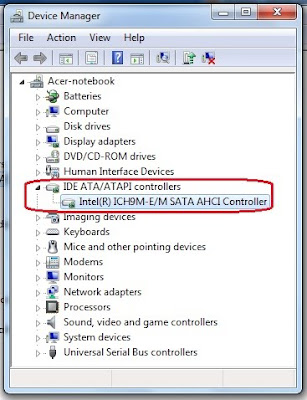
After looking anywhere in internet / googleman how to enable sata controller on my laptop with the default IDE controller mode, now I've found a way. most new laptops purchased may easily change the setting to the sata controllers ideas. for those who install windows seven it more easier. just download this exe file. and extract to the drive c / driver. IDE ATA/ ATA controller.">how to know if sata controller on your laptop working by looking at the device manager> IDE ATA / ATA controller. if there are drivers iastor.sys means your laptop is in the sata controller mode.

surabaya, jual, motherboard, ram, sodimm, ddr2, ddr3, ddr, vga, hardisk, hdd, harga, power, suply, psu, lcd, monitor, price, processor, windows, seven, ide, sata, ahci, pc, computer, modem, xp, lenovo notebook, notebook pc, quad core, laptop windows xp, hp 17 laptop, hp desktop, hp pavilion laptop, mini laptop, ipad, tablet notebook,  desktop pc, tablet pc, intel, hp, lenovo, acer, dell, toshiba, fujitsu, gigabyte, msi, pcchip, asus, kingston, hitachi, seagate, pendrive, western digital, patriot, samsung, transcend, adata, OCZ, buffalo, PQI, biostar, DFI, abit, ecs, zotac, foxconn, corsair, silverstone, antec, cooler master, thermaltake, mushkin, power color, XFX, palit, pixel view, HIS, sapphire, leadtek, gecube, laptop, pc, computer, usb, windows, seven, acer, toshiba, fujitsu, dell, gigabyte, msi, kingston, patriot, hitachi, seagate, maxto, sony, lg
here the easiest way for a new laptop to enable sata ahci on windows xp:
download the file first here.

http://download.lenovo.com/ibmdl/pub/pc/pccbbs/mobiles/7zir64ww.exe

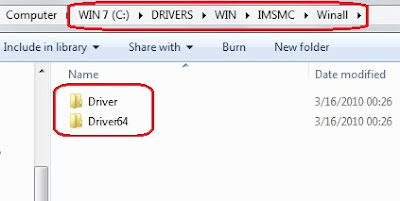
and extract to drive C/ like picture below.
for 32 bit > drive C > DRIVERS > WIN > IMSMC > Winall > driver
for 64 bit > drive C > DRIVERS > WIN > IMSMC > Winall > driver64

surabaya, jual, motherboard, ram, sodimm, ddr2, ddr3, ddr, vga, hardisk, hdd, harga, power, suply, psu, lcd, monitor, price, processor, windows, seven, ide, sata, ahci, pc, computer, modem, xp, lenovo notebook, notebook pc, quad core, laptop windows xp, hp 17 laptop, hp desktop, hp pavilion laptop, mini laptop, ipad, tablet notebook,  desktop pc, tablet pc, intel, hp, lenovo, acer, dell, toshiba, fujitsu, gigabyte, msi, pcchip, asus, kingston, hitachi, seagate, pendrive, western digital, patriot, samsung, transcend, adata, OCZ, buffalo, PQI, biostar, DFI, abit, ecs, zotac, foxconn, corsair, silverstone, antec, cooler master, thermaltake, mushkin, power color, XFX, palit, pixel view, HIS, sapphire, leadtek, gecube, laptop, pc, computer, usb, windows, seven, acer, toshiba, fujitsu, dell, gigabyte, msi, kingston, patriot, hitachi, seagate, maxto, sony, lg

1. Start Windows XP on ide mode.
2. Click Start and Control Panel.
3. Click Performance and Maintenance and System.
4. Click Hardware tab.
5. Click Device Manager button.
6. Click the + mark to expand IDE ATA/ATAPI controllers or Storage controllers category.
7. Right-click either of the following devices and then and click Properties;
* Intel® 82801HEM/HBM SATA AHCI Controller
* Intel® 82801GBM SATA AHCI Controller
* Intel® ICH9M-E/M SATA AHCI Controller (for chipset intel 45)
* Intel® ICH8M-E/ICH9M-E/M SATA RAID Controller. (for chipset intel 45)
(remember not to choose primary ide channel or secondary ide channel)

8. Click Driver tab.
9. Click Update Driver button.
10. Select No, not this time and click Next.
11. Select Install from a list or specific location.
12. Click Next button.
13. Select Search for the best driver in these locations and Include this location in the search.
14. Click Browse button.
15. Locate the driver folder and click OK button.
for 32 bit > drive C > DRIVERS > WIN > IMSMC > Winall > driver
for 64 bit > drive C > DRIVERS > WIN > IMSMC > Winall > driver64


16. Click Next button. The driver installation starts.
17. Click Finish button when the installation completes.
18. Click Close button.

and windows will reboot. don't forget to change ide to sata on bios mode

1. Press the F1 key (different for each laptop in acer use F2) to enter the BIOS Setup Utility when the Acer logo is seen on the screen. The BIOS Setup Utility menu will be displayed. If a password prompt appears, type the correct password.
2. Select Config.
3. Select Serial ATA (SATA).
4. Select AHCI from default IDE mode.
5. Press the F10 key to save the new setup, and then select Yes. The computer will reboot and Windows XP will start.

for windows seven just click twice setup mode:
drive C > DRIVERS > WIN > IMSMC > SETUP
(click twice) and setup will extract automaticaly. and after that windows will reboot. don't forget to change ide to sata on bios mode.

second way
If this can not change the settings on your laptop, use second way. gumbung used the first method and works because the hard drive is still the default setting, and not contaminated by a deep freeze or other softwares. and now the first metode can't be work.

first download the file here

http://download.lenovo.com/ibmdl/pub/pc/pccbbs/mobiles/6iim10ww.exe

and do the same step, the diferrent are file to be extracted IMSM and IMSMC. remember to use IMSM folder.

for 32 bit > drive C > DRIVERS > WIN > IMSM > Winall > driver
for 64 bit > drive C > DRIVERS > WIN > IMSM > Winall > driver64


open folder prepare at C/DRIVERS/WIN/IMSM and double click IMSM_PRE. and automaticaly install prepare for the hardisk (like not work at all, just splash cmd), after that install the driver like the first way before at the above. from device manager > updated driver

read more >>

07 July 2009

how to change IDE to SATA mode

hehehe...caranya gini...
1. masuk ke my computer > properti > hardware > driver signing -> set to ignore.
2. device manager > IDE ata controller > primary IDE channel > updated driver >
install from list > don't search, i will choose > sata controller
[jangan pilih IDE channel] > have disk > cari driver sata yg sudah di download
dan di extrak [f6flpy32 rar mode] pilih iastor. restart and done....

 
Design by Free WordPress Themes | Bloggerized by Lasantha - Premium Blogger Themes | Online Project management