eBill Me Number1Direct

01 April 2010

adding speed smart modem

okey just yes, now you see the picture below, the smart connection speed of 921.6 kbps seem to have, using hp smart modem that I used to use the internet for free 6 months, and now enough with 50,000 already unlimited 15 days.

How to maximize how you?
just you watch and practice the following steps:

1. Right click on your smart internet connection and select Properties, then will appear as shown below,


2. Then on the General tab click Configure, then will appear Modem Configuration, you can see there is no choice Maximum speed (bps), well there you select wrote in maximum, which is 921kbps. then click Ok and Ok again. By default when I first connected the smart speed is at 115kbps position, after disconection try
repeat dial, the modem speed is changed to 921kbps.


3. Now try to see the speed dial later.

Who need to remember here, allotment of smart internet connection can automatic adjust the maximum speed of our modems.

android run on windows mobile 6

Gen.Y DualBOOT v1.02[QVGA|VGA|WVGA][CAB]

Gen.Y DualBOOT: Dual boot solution for Windows Mobile devices with XDANDROID

Before I start, I wanted to give my props to all android developers that made android possible on our devices: please support these guys:XDANDROID team(Diamond/Raphael/Blackstone..),Topaz Android Team& others that I might have missed
*Just to clear things up, this is onlya bootlauncher app, u still need to install android for yourself on your device
Introduction
Android on WM devices is getting more and more popular, especially with the latest developments, and it's almost ready for daily use. I wanted to have an app so we could easily boot into both WM & Android, and Gen.Y DualBOOT was the solution. This release is made for VGA devices, and supports both booting from Internal Storage (moviNAND, e.g. Touch Diamond) & Storage Card (SDMemory, e.g. Touch Pro). WVGA version and QVGA version is also ready. This app has been tested on WM6.1, but will work perfectly on WM6.5.x as well.
Keep in mind thatyour android setup must be installed already at the root of your storage card in order for this app to work correctly(e.g. \Internal Storage\haret.exe or \Storage Card\haret.exe respectively)
User Guide
Here's a quick User Guide, showing the interface and what the buttons are for:

This app is launched by a registry key created in [HKEY_LOCAL_MACHINE\init], so it launches directly at boot after shell gets initialized.
Chefs:If u are going to cook this app into your ROM, make sure that this key gets added DURING your customization procedure (and not before!)
There are 2 checkboxes, enabling automatic boot:
AutoBoot: enabling this mode will automatically boot the OS of your choice after a 10 second countdown
> disabling autoboot will remove the countdown completely
FastBoot: enabling this mode will automatically boot the OS of your choice after a 3 second countdown (requires AutoBoot to be enabled first)
Now apart from these 2 checkboxes, u have2 radiobuttons, which allow u to choose which OS gets automatically booted.
And last but not least, u have the2 manual launch buttons. Pressing these buttons will directly launch (overriding autoboot) Windows Mobile or Android.
Registry
Gen.Y DualBOOT checks for 4 registry keys, which allow some form of customiation. Apart from the last key (StorageBootMode), all keys can be modified utilizing the radio & check buttons in the GUI. All of these keys can be found in:
[HKEY_CURRENT_USER\Software\Gen.Y\DualBOOT]
Here's quick list describing what the keys are for
*."AutoBootEnabled"=dword:1 (1:enable autoboot |0:disable autoboot)
*."FastBootEnabled"=dword:0 (1:enable fastboot |0:disable fastboot)
*."AutoBootAndroid"=dword:1 (1:boot Android |0:boot Windows)
*."StorageBootMode"=dword:0 (1:boot from Storage Card(SDMemory)|0:boot from Internal Storage(moviNAND))
The example values are the ones that are in the CAB for Internal Storage devices.
Planned features
- Check for android existance (if not, grayed out android button)
- Complete boot processes control
> Pause all WM boot processes while Gen.Y DualBOOT is running (should make things faster)
- Slight GUI redesign
- QVGA Fix
Changelog
v1.02
- Signed .exe file with SDKCerts
- Fixed boot problems by moving genyboot to Launch62 in HKLM\init
> Now boots even on stock ROMs!
v1.01
- Fixed registry issues
v1.00
- Initial Release
Download
Download the attached cabs or simply click the link below to download all resolutions in one zip package
v1.01 has faster booting but might not work on all roms
v1.02 is made to work on all roms, slightly slower bootup
There are 4 versions available:
*.QVGA, boot from Storage Card (e.g. Vogue,..)
*.VGA, boot from Internal Storage (e.g. Diamond)
*.VGA, boot from Storage Card (e.g. Raphael)
*.WVGA, boot from Storage Card (e.g. Blackstone, Topaz, Xperia,..)
Gen.Y DualBOOT v1.02 CABs(QVGA, VGA & WVGA included)
This appMUST be installed on your internal memoryin order for autoboot to work. (installing on internal storage/storage card will cause the app not to launch on boot)
For chefs: if u are also cooking in RunCC, cooking this app to the \Windows folder is recommended to save storage space (since the progress image are the same)
The CAB works for WWE (0409), NLD (0413), GER (0407), FRA (040C), SPA (0C0A) & ITA (0410) users. Non-supported language users with hi-res screens, please read the note below.
!Non-supported languages, VGA & WVGA only!: Please download the attached mui file, rename 0409 to your language ID, and copy to the installation folder (default: \Program Files\Gen.Y\DualBOOT). This is required in order for the app to work correctly. (not required for QVGA users)

Read more >>

boost windows seven

Windows 7 is the new operating system from Microsoft and is considered a major change in terms of features in Vista, you can optimize the Windows 7 by allowing the features needed and disabling all the features that are not wanted.Berikut are some little tips you can follow to get the best of Windows 7.

Disable Search Indexing

to speed up the process of searching, indexing services through files and folders on Windows systems and record information about them in an indexed file. But also consume some resources from the system, so if you do a search once a month will be better this feature is disabled.
read more

surabaya, jual, motherboard, ram, sodimm, ddr2, ddr3, ddr, vga, hardisk, hdd, harga, power, suply, psu, lcd, monitor, price, processor, windows, seven, ide, sata, ahci, pc, computer, modem, xp, lenovo notebook, notebook pc, quad core, laptop windows xp, hp 17 laptop, hp desktop, hp pavilion laptop, mini laptop, ipad, tablet notebook,  desktop pc, tablet pc, intel, hp, lenovo, acer, dell, toshiba, fujitsu, gigabyte, msi, pcchip, asus, kingston, hitachi, seagate, pendrive, western digital, patriot, samsung, transcend, adata, OCZ, buffalo, PQI, biostar, DFI, abit, ecs, zotac, foxconn, corsair, silverstone, antec, cooler master, thermaltake, mushkin, power color, XFX, palit, pixel view, HIS, sapphire, leadtek, gecube, laptop, pc, computer, usb, windows, seven, acer, toshiba, fujitsu, dell, gigabyte, msi, kingston, patriot, hitachi, seagate, maxto, sony, lg
Remove Unwanted Startup Programs

Running a startup program when you are logged into the system, so we see which programs you have allowed to run on start up, you may find many in the list where you no longer need to start at system boot up. To disable the programs that do not want running on startup, I click Start, then type msconfig and press Enter.
read more

surabaya, jual, motherboard, ram, sodimm, ddr2, ddr3, ddr, vga, hardisk, hdd, harga, power, suply, psu, lcd, monitor, price, processor, windows, seven, ide, sata, ahci, pc, computer, modem, xp, lenovo notebook, notebook pc, quad core, laptop windows xp, hp 17 laptop, hp desktop, hp pavilion laptop, mini laptop, ipad, tablet notebook,  desktop pc, tablet pc, intel, hp, lenovo, acer, dell, toshiba, fujitsu, gigabyte, msi, pcchip, asus, kingston, hitachi, seagate, pendrive, western digital, patriot, samsung, transcend, adata, OCZ, buffalo, PQI, biostar, DFI, abit, ecs, zotac, foxconn, corsair, silverstone, antec, cooler master, thermaltake, mushkin, power color, XFX, palit, pixel view, HIS, sapphire, leadtek, gecube, laptop, pc, computer, usb, windows, seven, acer, toshiba, fujitsu, dell, gigabyte, msi, kingston, patriot, hitachi, seagate, maxto, sony, lg
Disable Aero

Aero look and feel adds features to Windows 7 OS, without a doubt is one of the major features of Windows 7. But what if your system running slow? some applications take a lot of resources, it would be better if this feature is disabled. Follow the simple steps here to disable it in Windows 7.
read more

surabaya, jual, motherboard, ram, sodimm, ddr2, ddr3, ddr, vga, hardisk, hdd, harga, power, suply, psu, lcd, monitor, price, processor, windows, seven, ide, sata, ahci, pc, computer, modem, xp, lenovo notebook, notebook pc, quad core, laptop windows xp, hp 17 laptop, hp desktop, hp pavilion laptop, mini laptop, ipad, tablet notebook,  desktop pc, tablet pc, intel, hp, lenovo, acer, dell, toshiba, fujitsu, gigabyte, msi, pcchip, asus, kingston, hitachi, seagate, pendrive, western digital, patriot, samsung, transcend, adata, OCZ, buffalo, PQI, biostar, DFI, abit, ecs, zotac, foxconn, corsair, silverstone, antec, cooler master, thermaltake, mushkin, power color, XFX, palit, pixel view, HIS, sapphire, leadtek, gecube, laptop, pc, computer, usb, windows, seven, acer, toshiba, fujitsu, dell, gigabyte, msi, kingston, patriot, hitachi, seagate, maxto, sony, lg

16 March 2010

activating sata ahci windows XP

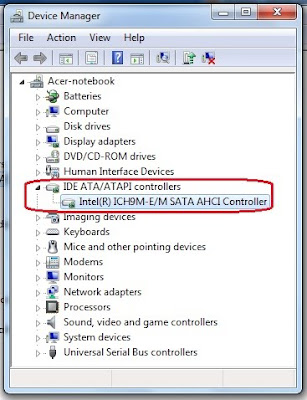
After looking anywhere in internet / googleman how to enable sata controller on my laptop with the default IDE controller mode, now I've found a way. most new laptops purchased may easily change the setting to the sata controllers ideas. for those who install windows seven it more easier. just download this exe file. and extract to the drive c / driver. IDE ATA/ ATA controller.">how to know if sata controller on your laptop working by looking at the device manager> IDE ATA / ATA controller. if there are drivers iastor.sys means your laptop is in the sata controller mode.

surabaya, jual, motherboard, ram, sodimm, ddr2, ddr3, ddr, vga, hardisk, hdd, harga, power, suply, psu, lcd, monitor, price, processor, windows, seven, ide, sata, ahci, pc, computer, modem, xp, lenovo notebook, notebook pc, quad core, laptop windows xp, hp 17 laptop, hp desktop, hp pavilion laptop, mini laptop, ipad, tablet notebook,  desktop pc, tablet pc, intel, hp, lenovo, acer, dell, toshiba, fujitsu, gigabyte, msi, pcchip, asus, kingston, hitachi, seagate, pendrive, western digital, patriot, samsung, transcend, adata, OCZ, buffalo, PQI, biostar, DFI, abit, ecs, zotac, foxconn, corsair, silverstone, antec, cooler master, thermaltake, mushkin, power color, XFX, palit, pixel view, HIS, sapphire, leadtek, gecube, laptop, pc, computer, usb, windows, seven, acer, toshiba, fujitsu, dell, gigabyte, msi, kingston, patriot, hitachi, seagate, maxto, sony, lg
here the easiest way for a new laptop to enable sata ahci on windows xp:
download the file first here.

http://download.lenovo.com/ibmdl/pub/pc/pccbbs/mobiles/7zir64ww.exe

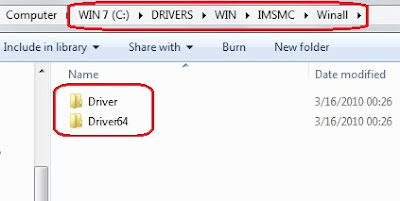
and extract to drive C/ like picture below.
for 32 bit > drive C > DRIVERS > WIN > IMSMC > Winall > driver
for 64 bit > drive C > DRIVERS > WIN > IMSMC > Winall > driver64

surabaya, jual, motherboard, ram, sodimm, ddr2, ddr3, ddr, vga, hardisk, hdd, harga, power, suply, psu, lcd, monitor, price, processor, windows, seven, ide, sata, ahci, pc, computer, modem, xp, lenovo notebook, notebook pc, quad core, laptop windows xp, hp 17 laptop, hp desktop, hp pavilion laptop, mini laptop, ipad, tablet notebook,  desktop pc, tablet pc, intel, hp, lenovo, acer, dell, toshiba, fujitsu, gigabyte, msi, pcchip, asus, kingston, hitachi, seagate, pendrive, western digital, patriot, samsung, transcend, adata, OCZ, buffalo, PQI, biostar, DFI, abit, ecs, zotac, foxconn, corsair, silverstone, antec, cooler master, thermaltake, mushkin, power color, XFX, palit, pixel view, HIS, sapphire, leadtek, gecube, laptop, pc, computer, usb, windows, seven, acer, toshiba, fujitsu, dell, gigabyte, msi, kingston, patriot, hitachi, seagate, maxto, sony, lg

1. Start Windows XP on ide mode.
2. Click Start and Control Panel.
3. Click Performance and Maintenance and System.
4. Click Hardware tab.
5. Click Device Manager button.
6. Click the + mark to expand IDE ATA/ATAPI controllers or Storage controllers category.
7. Right-click either of the following devices and then and click Properties;
* Intel® 82801HEM/HBM SATA AHCI Controller
* Intel® 82801GBM SATA AHCI Controller
* Intel® ICH9M-E/M SATA AHCI Controller (for chipset intel 45)
* Intel® ICH8M-E/ICH9M-E/M SATA RAID Controller. (for chipset intel 45)
(remember not to choose primary ide channel or secondary ide channel)

8. Click Driver tab.
9. Click Update Driver button.
10. Select No, not this time and click Next.
11. Select Install from a list or specific location.
12. Click Next button.
13. Select Search for the best driver in these locations and Include this location in the search.
14. Click Browse button.
15. Locate the driver folder and click OK button.
for 32 bit > drive C > DRIVERS > WIN > IMSMC > Winall > driver
for 64 bit > drive C > DRIVERS > WIN > IMSMC > Winall > driver64


16. Click Next button. The driver installation starts.
17. Click Finish button when the installation completes.
18. Click Close button.

and windows will reboot. don't forget to change ide to sata on bios mode

1. Press the F1 key (different for each laptop in acer use F2) to enter the BIOS Setup Utility when the Acer logo is seen on the screen. The BIOS Setup Utility menu will be displayed. If a password prompt appears, type the correct password.
2. Select Config.
3. Select Serial ATA (SATA).
4. Select AHCI from default IDE mode.
5. Press the F10 key to save the new setup, and then select Yes. The computer will reboot and Windows XP will start.

for windows seven just click twice setup mode:
drive C > DRIVERS > WIN > IMSMC > SETUP
(click twice) and setup will extract automaticaly. and after that windows will reboot. don't forget to change ide to sata on bios mode.

second way
If this can not change the settings on your laptop, use second way. gumbung used the first method and works because the hard drive is still the default setting, and not contaminated by a deep freeze or other softwares. and now the first metode can't be work.

first download the file here

http://download.lenovo.com/ibmdl/pub/pc/pccbbs/mobiles/6iim10ww.exe

and do the same step, the diferrent are file to be extracted IMSM and IMSMC. remember to use IMSM folder.

for 32 bit > drive C > DRIVERS > WIN > IMSM > Winall > driver
for 64 bit > drive C > DRIVERS > WIN > IMSM > Winall > driver64


open folder prepare at C/DRIVERS/WIN/IMSM and double click IMSM_PRE. and automaticaly install prepare for the hardisk (like not work at all, just splash cmd), after that install the driver like the first way before at the above. from device manager > updated driver

read more >>

03 March 2010

laptop with eksternal VGA

laptop dengan VGA eksternal? bisa. bagi Anda yang mempunyai laptop dengan VGA standart seperti intel x3100 atau yang lainnya pasti kecewa tidak bisa main games berat seperti crisis, assasin creed, warhead, dll. tapi kini ada solusi untuk masalah tersebut. kini anda dapat memakai sebuah VGA yang memang dibuat khusus untuk PC/desktop, dengan memakai adaptor. Produk VGA External untuk Notebook yg sudah ada di pasaran adalah: ViDock2. check apa laptop Anda bisa memakainya disini.


surabaya, jual, motherboard, ram, sodimm, ddr2, ddr3, ddr, vga, hardisk, hdd, harga, power, suply, psu, lcd, monitor, price, processor, windows, seven, ide, sata, ahci, pc, computer, modem, xp, lenovo notebook, notebook pc, quad core, laptop windows xp, hp 17 laptop, hp desktop, hp pavilion laptop, mini laptop, ipad, tablet notebook,  desktop pc, tablet pc, intel, hp, lenovo, acer, dell, toshiba, fujitsu, gigabyte, msi, pcchip, asus, kingston, hitachi, seagate, pendrive, western digital, patriot, samsung, transcend, adata, OCZ, buffalo, PQI, biostar, DFI, abit, ecs, zotac, foxconn, corsair, silverstone, antec, cooler master, thermaltake, mushkin, power color, XFX, palit, pixel view, HIS, sapphire, leadtek, gecube, laptop, pc, computer, usb, windows, seven, acer, toshiba, fujitsu, dell, gigabyte, msi, kingston, patriot, hitachi, seagate, maxto, sony, lgsurabaya, jual, motherboard, ram, sodimm, ddr2, ddr3, ddr, vga, hardisk, hdd, harga, power, suply, psu, lcd, monitor, price, processor, windows, seven, ide, sata, ahci, pc, computer, modem, xp, lenovo notebook, notebook pc, quad core, laptop windows xp, hp 17 laptop, hp desktop, hp pavilion laptop, mini laptop, ipad, tablet notebook,  desktop pc, tablet pc, intel, hp, lenovo, acer, dell, toshiba, fujitsu, gigabyte, msi, pcchip, asus, kingston, hitachi, seagate, pendrive, western digital, patriot, samsung, transcend, adata, OCZ, buffalo, PQI, biostar, DFI, abit, ecs, zotac, foxconn, corsair, silverstone, antec, cooler master, thermaltake, mushkin, power color, XFX, palit, pixel view, HIS, sapphire, leadtek, gecube, laptop, pc, computer, usb, windows, seven, acer, toshiba, fujitsu, dell, gigabyte, msi, kingston, patriot, hitachi, seagate, maxto, sony, lg
nvidia corp juga sedang merencanakan membuat eksternal VGA accelerator untuk laptop

 
Design by Free WordPress Themes | Bloggerized by Lasantha - Premium Blogger Themes | Online Project management