eBill Me Number1Direct
Showing posts with label windows. Show all posts

01 November 2010

com surrogate error libavcodec.dll in windows 7

When try to open " My Pictures" in Windows explorer it shuts down and starts again. Vista or seven then reports that it is a "FFmeg problem" as I have no clue what FFmeg is, I can now not open my pictures folder. Can someone PLEASE tell how I can rectify this problem..
This is the report from Vista or seven

"Product
COM Surrogate

Problem
Stopped working

Status
More information available

Problem signature
Problem Event Name: APPCRASH
Application Name: DllHost.exe
Application Version: 6.0.6000.16386
Application Timestamp: 4549b14e
Fault Module Name: libavcodec.dll
Fault Module Version: 0.0.0.0
Fault Module Timestamp: 47bf1f3c
Exception Code: c0000005
Exception Offset: 001ac183
OS Version: 6.0.6001.2.1.0.256.1
Locale ID: 2057
Additional Information 1: fd00
Additional Information 2: ea6f5fe8924aaa756324d57f87834160
Additional Information 3: fd00
Additional Information 4: ea6f5fe8924aaa756324d57f87834160

solution for this problem just re-install klite mega codec to your system, and done.

21 October 2010

Windows Mobile Operating System

Being updated with your important mails on the right time at the right place is very important in this competitive world. So won’t it be like a beneficial if you could view your mails on your phone while you are away from your computer or laptop? Yes, by using Windows Mobile Operating System, you can make sure that you can access Microsoft Office Outlook information, such as e-mail, contacts, calendar appointments, tasks, and notes hassle-free. Windows Mobile is a mobile operating system developed by Microsoft for use in smart phones and mobile devices. Sync your Windows mobile device with an application hosting provider such as Apps 4 Rent using hosted Microsoft Exchange for cost-effectiveness, convenience, reliability, productivity enhanced features, and excellent 24/7 support.

Configuring Windows Phone to sync with Microsoft Exchange Server using phone

1) Make sure you have a direct Internet connection by setting up a Wi-Fi connection or by using your phone’s cellular connection.

2) On your phone, on the Home screen, click Start > Programs > ActiveSync > Menu > Add Server Source.

3) ActiveSync menu with Add Server Source selected

4) Note If you’ve already set up a sync partnership with an Exchange server, the option appears as Configure Server instead of Add Server Source.

5) Enter your e-mail address.

6) Select Attempt to detect Exchange Server Settings automatically, and click Next.

7) In the Server address field, enter the name of the Exchange server.

8) If encrypted connections are supported by your Exchange server, select the This server requires an encrypted (SSL) connection check box, and click Next.

9) Enter your user name, password, and domain name.

10) If you want the phone to save your password so that you won’t have to enter it again when synchronizing, select the Save password check box, and click Next.

11) Select the check boxes for the information that you want to sync with the Exchange server.

12) To change available synchronization settings, select the type of information, and click Menu > Settings.

13) If you want to change the rules for resolving synchronization conflicts, click Menu > Advanced.

14) Click Finish.

Best Backup Software

Performing data backup software is especially useful when your work is done on a laptop, whether at the office or at home. So, in case something bad happens to your hard disk, the information on that drive can be restored, once the drive is fixed or replaced, with your back up files.

If you store valuable information on your computer, it is wise to use backup software. System backup software stores information you have on your computer. It is like having another copy of everything that you keep on your computer.

Having backup software enables you to save time. Imagine the amount of time you can save if you use software to backup all files, programs, and special applications on your computer and then the next day your hard drive crashes. There is even an automatic backup software that immediately performs backup whenever new data is saved on the hard drive or whenever you have set a backup schedule.
The concept of retrieving the data you saved on your laptop is the primary benefit you can get from pc backup software. This is very important particularly in corporations and business enterprises that view information as revenues. Losing data can cost millions of dollars.

The backup software is compatible with different media and devices. However, if you choose a built-in software, the capability of doing backup is limited. External software allows you to conveniently do backup on your data to any device, optical media and storage systems. You can even initiate partitioning tasks with backup applications. Thus, you can zip your data into smaller bits and store them in many media.

Backup software comes in many types to meet the varying needs of the persons and enterprises. For example, there is specifically designed enterprise backup software. Depending on the operating system you are using, there is software that is compatible for your computer.
Almost all backup software is capable of encryption. Many of the best backup software available in the market can automatically encrypt your data during transfer and backup operations. Hence, you can have the confidence to transfer files onto another disk drive without worrying about data leakage. Encryption is essential, if you are transferring data to a web server.

So, if you are using windows, you can enjoy the benefits of backup using windows xp backup software, vista backup software, windows server backup software and Microsoft backup software. There is also linux backup software for linux operating systems.
For remote operations, choose the appropriate remote backup software or offsite backup software. If you are transferring files to a web, it is good to have the online backup software. Data recovery is a feature of backup software that is very convenient.
In case of disasters, your data is not lost. It can be retrieved and restored back into your systems as if nothing happened. The best software does not even require special hardware or complicated software to make things happen the way you should want them to be.

For more information about the backup software that best suits your need, check out the web for resources. You can also read reviews on products , forum discussions and articles.

Eliminate The Lag In Your Computer

Since technology is not perfect and we do experience troubles with it from time to time, we should look for ways to fix it rather than hope for perfect pieces of technology.it has definitely came a long way. With all of the advancements in technology, it seems really ridiculous to experience computer problems. But, that is the problem with technology, it is not perfect. Fortunately, this is a much more logical expectation. If you are experiencing a lag in your computer, do not get frustrated with technology. You do not need to shrug it off to the age of the computer. Purchasing a new computer is not the only solution. There are ways to fix the issues with technology.

A lag in your computer can be the result of multiple different things. However, you do not need to assume that you will need to get out a check list and spend hours going through the possibilities. The most common thing to do is assume that it is one of the common reasons and solve that first.

The most common reasons for a lag in a computer is due to the following things:

The computer has little to no storage space left.

The computer has a slow speed that is likely continuing to decrease over time.

Or it could be a mixture of both options.

Regardless of which option it is, neither of them are good for your computer and if it is both possibilities, then that definitely is not good for the computer. However, they are both quite fixable. The easiest way and quickest way to deal with these two possibilities is to perform a clean up scan on the computer's registry.

The clean up scan is a scan that will be conducted on the computer's registry. Just like the name of the scan, it will "clean up" the computer's registry. This means that any information located in the registry of the computer that is no longer used or needed will be removed in order to make more space in the registry. With more space being freed up in the registry, it also means that the speed of the computer will increase. If any information stored in the registry is found to be broken, the scan will also notify the user and allow repairs to be made to the broken files. The clean up scan should be done once a month.

01 April 2010

boost windows seven

Windows 7 is the new operating system from Microsoft and is considered a major change in terms of features in Vista, you can optimize the Windows 7 by allowing the features needed and disabling all the features that are not wanted.Berikut are some little tips you can follow to get the best of Windows 7.

Disable Search Indexing

to speed up the process of searching, indexing services through files and folders on Windows systems and record information about them in an indexed file. But also consume some resources from the system, so if you do a search once a month will be better this feature is disabled.
read more

surabaya, jual, motherboard, ram, sodimm, ddr2, ddr3, ddr, vga, hardisk, hdd, harga, power, suply, psu, lcd, monitor, price, processor, windows, seven, ide, sata, ahci, pc, computer, modem, xp, lenovo notebook, notebook pc, quad core, laptop windows xp, hp 17 laptop, hp desktop, hp pavilion laptop, mini laptop, ipad, tablet notebook,  desktop pc, tablet pc, intel, hp, lenovo, acer, dell, toshiba, fujitsu, gigabyte, msi, pcchip, asus, kingston, hitachi, seagate, pendrive, western digital, patriot, samsung, transcend, adata, OCZ, buffalo, PQI, biostar, DFI, abit, ecs, zotac, foxconn, corsair, silverstone, antec, cooler master, thermaltake, mushkin, power color, XFX, palit, pixel view, HIS, sapphire, leadtek, gecube, laptop, pc, computer, usb, windows, seven, acer, toshiba, fujitsu, dell, gigabyte, msi, kingston, patriot, hitachi, seagate, maxto, sony, lg
Remove Unwanted Startup Programs

Running a startup program when you are logged into the system, so we see which programs you have allowed to run on start up, you may find many in the list where you no longer need to start at system boot up. To disable the programs that do not want running on startup, I click Start, then type msconfig and press Enter.
read more

surabaya, jual, motherboard, ram, sodimm, ddr2, ddr3, ddr, vga, hardisk, hdd, harga, power, suply, psu, lcd, monitor, price, processor, windows, seven, ide, sata, ahci, pc, computer, modem, xp, lenovo notebook, notebook pc, quad core, laptop windows xp, hp 17 laptop, hp desktop, hp pavilion laptop, mini laptop, ipad, tablet notebook,  desktop pc, tablet pc, intel, hp, lenovo, acer, dell, toshiba, fujitsu, gigabyte, msi, pcchip, asus, kingston, hitachi, seagate, pendrive, western digital, patriot, samsung, transcend, adata, OCZ, buffalo, PQI, biostar, DFI, abit, ecs, zotac, foxconn, corsair, silverstone, antec, cooler master, thermaltake, mushkin, power color, XFX, palit, pixel view, HIS, sapphire, leadtek, gecube, laptop, pc, computer, usb, windows, seven, acer, toshiba, fujitsu, dell, gigabyte, msi, kingston, patriot, hitachi, seagate, maxto, sony, lg
Disable Aero

Aero look and feel adds features to Windows 7 OS, without a doubt is one of the major features of Windows 7. But what if your system running slow? some applications take a lot of resources, it would be better if this feature is disabled. Follow the simple steps here to disable it in Windows 7.
read more

surabaya, jual, motherboard, ram, sodimm, ddr2, ddr3, ddr, vga, hardisk, hdd, harga, power, suply, psu, lcd, monitor, price, processor, windows, seven, ide, sata, ahci, pc, computer, modem, xp, lenovo notebook, notebook pc, quad core, laptop windows xp, hp 17 laptop, hp desktop, hp pavilion laptop, mini laptop, ipad, tablet notebook,  desktop pc, tablet pc, intel, hp, lenovo, acer, dell, toshiba, fujitsu, gigabyte, msi, pcchip, asus, kingston, hitachi, seagate, pendrive, western digital, patriot, samsung, transcend, adata, OCZ, buffalo, PQI, biostar, DFI, abit, ecs, zotac, foxconn, corsair, silverstone, antec, cooler master, thermaltake, mushkin, power color, XFX, palit, pixel view, HIS, sapphire, leadtek, gecube, laptop, pc, computer, usb, windows, seven, acer, toshiba, fujitsu, dell, gigabyte, msi, kingston, patriot, hitachi, seagate, maxto, sony, lg

16 March 2010

activating sata ahci windows XP

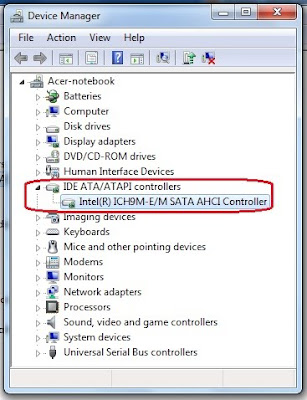
After looking anywhere in internet / googleman how to enable sata controller on my laptop with the default IDE controller mode, now I've found a way. most new laptops purchased may easily change the setting to the sata controllers ideas. for those who install windows seven it more easier. just download this exe file. and extract to the drive c / driver. IDE ATA/ ATA controller.">how to know if sata controller on your laptop working by looking at the device manager> IDE ATA / ATA controller. if there are drivers iastor.sys means your laptop is in the sata controller mode.

surabaya, jual, motherboard, ram, sodimm, ddr2, ddr3, ddr, vga, hardisk, hdd, harga, power, suply, psu, lcd, monitor, price, processor, windows, seven, ide, sata, ahci, pc, computer, modem, xp, lenovo notebook, notebook pc, quad core, laptop windows xp, hp 17 laptop, hp desktop, hp pavilion laptop, mini laptop, ipad, tablet notebook,  desktop pc, tablet pc, intel, hp, lenovo, acer, dell, toshiba, fujitsu, gigabyte, msi, pcchip, asus, kingston, hitachi, seagate, pendrive, western digital, patriot, samsung, transcend, adata, OCZ, buffalo, PQI, biostar, DFI, abit, ecs, zotac, foxconn, corsair, silverstone, antec, cooler master, thermaltake, mushkin, power color, XFX, palit, pixel view, HIS, sapphire, leadtek, gecube, laptop, pc, computer, usb, windows, seven, acer, toshiba, fujitsu, dell, gigabyte, msi, kingston, patriot, hitachi, seagate, maxto, sony, lg
here the easiest way for a new laptop to enable sata ahci on windows xp:
download the file first here.

http://download.lenovo.com/ibmdl/pub/pc/pccbbs/mobiles/7zir64ww.exe

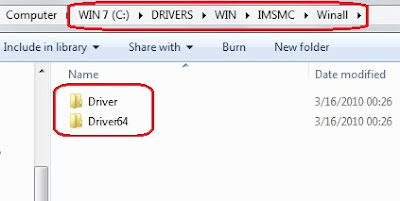
and extract to drive C/ like picture below.
for 32 bit > drive C > DRIVERS > WIN > IMSMC > Winall > driver
for 64 bit > drive C > DRIVERS > WIN > IMSMC > Winall > driver64

surabaya, jual, motherboard, ram, sodimm, ddr2, ddr3, ddr, vga, hardisk, hdd, harga, power, suply, psu, lcd, monitor, price, processor, windows, seven, ide, sata, ahci, pc, computer, modem, xp, lenovo notebook, notebook pc, quad core, laptop windows xp, hp 17 laptop, hp desktop, hp pavilion laptop, mini laptop, ipad, tablet notebook,  desktop pc, tablet pc, intel, hp, lenovo, acer, dell, toshiba, fujitsu, gigabyte, msi, pcchip, asus, kingston, hitachi, seagate, pendrive, western digital, patriot, samsung, transcend, adata, OCZ, buffalo, PQI, biostar, DFI, abit, ecs, zotac, foxconn, corsair, silverstone, antec, cooler master, thermaltake, mushkin, power color, XFX, palit, pixel view, HIS, sapphire, leadtek, gecube, laptop, pc, computer, usb, windows, seven, acer, toshiba, fujitsu, dell, gigabyte, msi, kingston, patriot, hitachi, seagate, maxto, sony, lg

1. Start Windows XP on ide mode.
2. Click Start and Control Panel.
3. Click Performance and Maintenance and System.
4. Click Hardware tab.
5. Click Device Manager button.
6. Click the + mark to expand IDE ATA/ATAPI controllers or Storage controllers category.
7. Right-click either of the following devices and then and click Properties;
* Intel® 82801HEM/HBM SATA AHCI Controller
* Intel® 82801GBM SATA AHCI Controller
* Intel® ICH9M-E/M SATA AHCI Controller (for chipset intel 45)
* Intel® ICH8M-E/ICH9M-E/M SATA RAID Controller. (for chipset intel 45)
(remember not to choose primary ide channel or secondary ide channel)

8. Click Driver tab.
9. Click Update Driver button.
10. Select No, not this time and click Next.
11. Select Install from a list or specific location.
12. Click Next button.
13. Select Search for the best driver in these locations and Include this location in the search.
14. Click Browse button.
15. Locate the driver folder and click OK button.
for 32 bit > drive C > DRIVERS > WIN > IMSMC > Winall > driver
for 64 bit > drive C > DRIVERS > WIN > IMSMC > Winall > driver64


16. Click Next button. The driver installation starts.
17. Click Finish button when the installation completes.
18. Click Close button.

and windows will reboot. don't forget to change ide to sata on bios mode

1. Press the F1 key (different for each laptop in acer use F2) to enter the BIOS Setup Utility when the Acer logo is seen on the screen. The BIOS Setup Utility menu will be displayed. If a password prompt appears, type the correct password.
2. Select Config.
3. Select Serial ATA (SATA).
4. Select AHCI from default IDE mode.
5. Press the F10 key to save the new setup, and then select Yes. The computer will reboot and Windows XP will start.

for windows seven just click twice setup mode:
drive C > DRIVERS > WIN > IMSMC > SETUP
(click twice) and setup will extract automaticaly. and after that windows will reboot. don't forget to change ide to sata on bios mode.

second way
If this can not change the settings on your laptop, use second way. gumbung used the first method and works because the hard drive is still the default setting, and not contaminated by a deep freeze or other softwares. and now the first metode can't be work.

first download the file here

http://download.lenovo.com/ibmdl/pub/pc/pccbbs/mobiles/6iim10ww.exe

and do the same step, the diferrent are file to be extracted IMSM and IMSMC. remember to use IMSM folder.

for 32 bit > drive C > DRIVERS > WIN > IMSM > Winall > driver
for 64 bit > drive C > DRIVERS > WIN > IMSM > Winall > driver64


open folder prepare at C/DRIVERS/WIN/IMSM and double click IMSM_PRE. and automaticaly install prepare for the hardisk (like not work at all, just splash cmd), after that install the driver like the first way before at the above. from device manager > updated driver

read more >>

18 February 2010

change boot screen windows seven

apakah anda bosan dengan tampilan boot screen windows? ada trik untuk melihat boot screen yang disembunyikan oleh windows. ikuti langkah berikut ini.

1. klik meu start, pilih run selanjutnya ketik MSCONFIG, lalu tekan enter.

2. selanjutnya anda akan melihat tool tab configuration, klik boot tab.

3,. dibawah boot option centang NO GUI BOOT.

4. tekan ok, dan reboot komputer anda.

sekarang anda akan melihat boot screen baru yang tadinya disembunyikan oleh windows.

surabaya, jual, motherboard, ram, sodimm, ddr2, ddr3, ddr, vga, hardisk, hdd, harga, power, suply, psu, lcd, monitor, price, processor, windows, seven, ide, sata, ahci, pc, computer, modem, xp, lenovo notebook, notebook pc, quad core, laptop windows xp, hp 17 laptop, hp desktop, hp pavilion laptop, mini laptop, ipad, tablet notebook,  desktop pc, tablet pc, intel, hp, lenovo, acer, dell, toshiba, fujitsu, gigabyte, msi, pcchip, asus, kingston, hitachi, seagate, pendrive, western digital, patriot, samsung, transcend, adata, OCZ, buffalo, PQI, biostar, DFI, abit, ecs, zotac, foxconn, corsair, silverstone, antec, cooler master, thermaltake, mushkin, power color, XFX, palit, pixel view, HIS, sapphire, leadtek, gecube, laptop, pc, computer, usb, windows, seven, acer, toshiba, fujitsu, dell, gigabyte, msi, kingston, patriot, hitachi, seagate, maxto, sony, lg

12 February 2010

activating windows 7 sata ahci

when we first install windows seven, the default is ata controller. but sata controller still does not work if still detected ata drive on device manager. check through softwares Everest. though AHCI is active. so that the drive was detected sata drives then we have to install a new driver called the Intel matrix storage. let you see the controller drivers on your pc or laptop, there are no drivers iastor.sys not? well it means your drive recognized by windows as a drive ata. please first download intel matrix storage drivers.

way is to install the drivers who had been downloaded, you will find that the drivers installed on
C - DRIVERS - WIN - IMSMC - setup. click twice setup to install drivers iastor.sys. after that the windows will ask for a reboot, after logon the windows found new drivers and asked for a reboot again. after logon then your drive has now become SATA AHCI. try to check the device manager. if iastor.sys installed.
download driver here

surabaya, jual, motherboard, ram, sodimm, ddr2, ddr3, ddr, vga, hardisk, hdd, harga, power, suply, psu, lcd, monitor, price, processor, windows, seven, ide, sata, ahci, pc, computer, modem, xp, lenovo notebook, notebook pc, quad core, laptop windows xp, hp 17 laptop, hp desktop, hp pavilion laptop, mini laptop, ipad, tablet notebook,  desktop pc, tablet pc, intel, hp, lenovo, acer, dell, toshiba, fujitsu, gigabyte, msi, pcchip, asus, kingston, hitachi, seagate, pendrive, western digital, patriot, samsung, transcend, adata, OCZ, buffalo, PQI, biostar, DFI, abit, ecs, zotac, foxconn, corsair, silverstone, antec, cooler master, thermaltake, mushkin, power color, XFX, palit, pixel view, HIS, sapphire, leadtek, gecube, laptop, pc, computer, usb, windows, seven, acer, toshiba, fujitsu, dell, gigabyte, msi, kingston, patriot, hitachi, seagate, maxto, sony, lg

07 July 2009

how to change IDE to SATA mode

hehehe...caranya gini...
1. masuk ke my computer > properti > hardware > driver signing -> set to ignore.
2. device manager > IDE ata controller > primary IDE channel > updated driver >
install from list > don't search, i will choose > sata controller
[jangan pilih IDE channel] > have disk > cari driver sata yg sudah di download
dan di extrak [f6flpy32 rar mode] pilih iastor. restart and done....

installing windows xp professional service pack 2

acer laptop 4730zg sudah terinstall linux linpus, yaitu dos linux.
untuk menginstall win xp pertama masuk bios dg menekan F2 waktu boot pertama. setting bios pada sata mode pilih ke IDE mode bukan SATA mode, karena akan blue screen. win xp hanya bekerja pada ide mode di setting defaultnya. setelah itu set boot ke dvd-rw, tekan F10 untuk save seting, done.

download all stuff for acer aspire 4730 ZG

here to download new driver

how to make sata to your laptop. here to download

 
Design by Free WordPress Themes | Bloggerized by Lasantha - Premium Blogger Themes | Online Project management